Digital Grading Co
- 4.5
- Rating
- 50.00K
- Installs
- Free
- Price

 Analysis by App-foxy
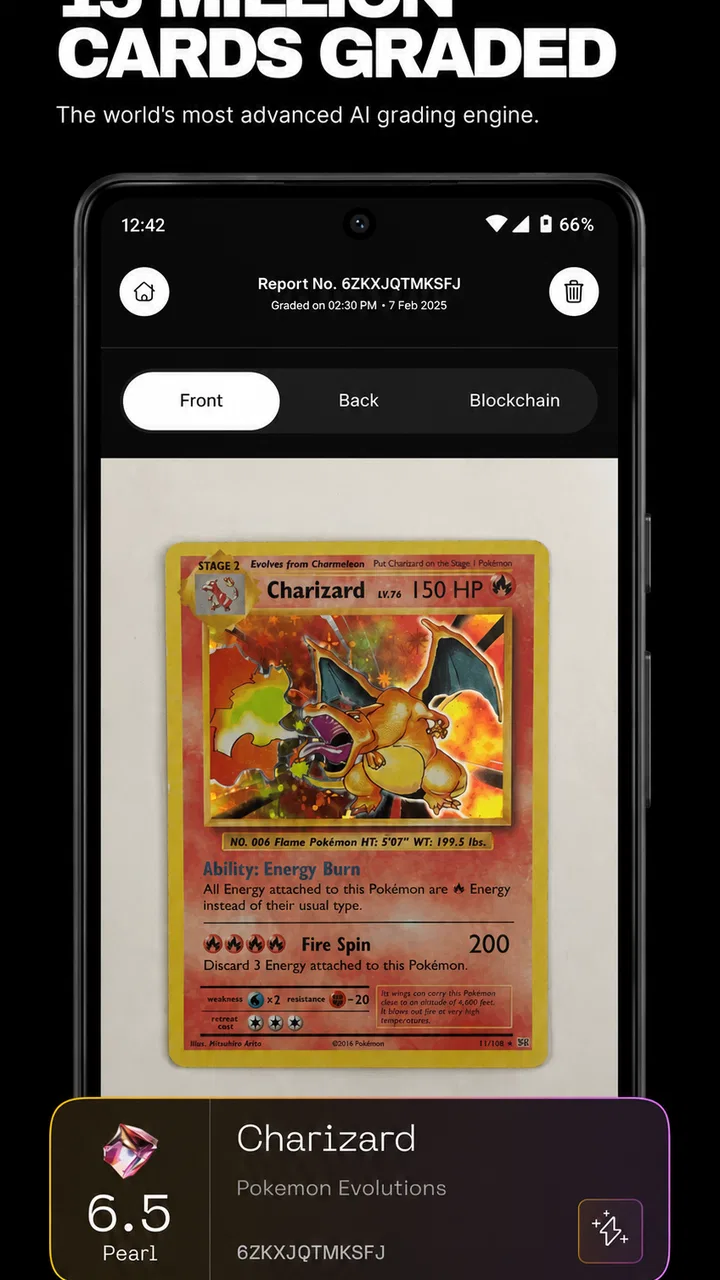
I approached Digital Grading Co as a collector’s companion rather than a replacement for professional grading. Its focus is clear: use artificial intelligence to examine cards, add an augmented-reality layer for authentication, and turn a personal collection into something easier to understand. That combination makes it more interesting than a basic price-checking tool, but it also means trust matters more than flashy presentation. When an app comments on the condition or authenticity of a valuable card, I want to know exactly what I am being shown, what I am deciding for myself, and where caution is still necessary.
Developed by HOBBY LABS LTD, this free lifestyle app is aimed at people who buy, sell, organize, or simply enjoy collectible cards. It has a 4.5 average from around 1.2 thousand ratings and has passed 50 thousand installs, which gives it a useful early audience without making it feel like an established authority on every card market. The app is rated for Everyone, runs on Android 7.0 and later, and the current version is 1.6.1. Those details make it accessible to many casual collectors, although accessibility should not be confused with professional certainty.
What the app is really useful for in a collection
The best way to use this app is as a first-pass inspection tool. If I have a box of cards and want to sort them into “worth a closer look,” “probably ordinary,” and “needs more research,” an AI-assisted scan can save time. It is especially practical when the alternative is opening several browser tabs, comparing images manually, and trying to remember which small differences separate one printing from another.
You May Also Like

 Blood Strike: 2.5 Anniversary
Blood Strike’s Loadouts Turn Every Drop Into a Tactical Gamble
A close look at Blood Strike’s custom loadouts: how fast access to signature weapons reshapes its battle royale rhythm, rewards preparation, and narrows the gap between fights.

 Pandora - Music & Podcasts
Pandora’s Music Is Easy to Start, but Harder to Recover
Pandora’s strength is its low-effort path from a seed to a station. Its weak spot is how much confidence it asks you to place in connection, setup, and quiet recovery.

 8 Ball Pool
 Is Built on Rivalries, Rematches, and Routine
A close look at the rivalries, rematches, shared routines, and unanswered safety questions that turn a quick pool match into a persistent mobile community.

 Samsung Music
’s Quiet Strength Is Playing What You Already Own
Its reach comes less from spectacle than from dependable access to a personal library. That simplicity is both the app’s strongest retention engine and its ceiling.

 AccuWeather: Weather Radar
AccuWeather Review: A Quick, Clear Forecast for Everyday Decisions
For everyday plans, the best forecast is the one you can understand quickly. AccuWeather makes rain timing, radar, and local conditions easy to act on, with a few trade-offs.

 Hill Climb Racing
Why Hill Climb Racing Still Turns Crashes Into One More Run
A tiny car, a bumpy hill and one more upgrade: Hill Climb Racing keeps resurfacing because its simple chaos makes every near-miss feel personal.
More From Our News Desk
View All News


The value is not limited to identifying a card. The combination of grading assistance and collector insights suggests a workflow in which I can move from looking at an individual item to thinking about the collection around it. That matters because collectors often make poor decisions when they inspect one card in isolation. A card may look attractive, but its condition, edition, centering, surface, and market context all affect what I should do next. A useful app should help me slow down before treating a promising discovery as a confirmed result.
I found the AR authentication idea particularly suited to comparison work. Holding a card in front of a camera and using an overlay can make visual checks more engaging than scrolling through static reference images. It may help me notice placement, borders, symbols, or other visible details that deserve attention. Still, an augmented-reality view should be treated as an aid to observation, not as proof that a card is genuine. A counterfeit can imitate visible features, and a camera cannot replace a specialist’s physical examination.
That distinction is the first important habit I would recommend: use the app to decide what deserves deeper investigation, not to make an expensive purchase feel automatically safe. If a seller presents an app result as a guarantee, I would remain cautious. The responsible use of a digital assessment is to combine it with provenance, clear photographs, seller reputation, comparison with trusted references, and, for a high-value card, professional authentication or grading.
Trust begins with visible choices
Because this app works with camera-based card analysis and potentially personal collection information, I pay close attention to the moments when it asks me to make a choice. Camera access is central to scanning and AR, but I would still expect the operating system to show a permission request that I can accept or decline. If I am only browsing ideas or reading insights, I should not need to grant camera access immediately. A sensible approach is to deny access until I reach a feature that genuinely requires it, then decide whether that feature is worth enabling.
The same principle applies to any account or collection workflow the app presents. I want to see whether signing in is necessary for the specific task I am attempting, rather than assuming that every visitor must create an account. If the app offers a way to explore without an account, that is more comfortable for casual users. If an account becomes necessary for saving cards or collection history, I would look for clear explanations of what is saved and for controls that let me manage that information.
I would not treat the app’s presence on a device as permission to photograph everything around me. For a clean scan, I would place one card on a plain surface, keep other cards and personal objects outside the frame, and avoid capturing shipping labels, addresses, or receipts. This is a small practical step, but it reduces the amount of unrelated information that could appear in an image. It also improves the scan itself by giving the recognition system less visual clutter to interpret.
When using any AI feature, I want the result to be presented as an assessment rather than an unquestionable verdict. The wording matters. A confidence indicator, a request to retake a blurry image, or a prompt to compare the result manually would encourage better decisions. If the app makes a conclusion look more certain than the underlying photograph allows, I would lower my trust even if the interface feels polished. The most trustworthy result is one that leaves room for the user to verify it.
How I would handle sensitive collection moments
There are three moments when I would be especially careful: scanning a valuable card, saving a collection, and sharing a result with someone else. A high-value card can reveal more than its identity. A photograph may show a distinctive item, a storage setup, or a collection that someone would rather not advertise. I would therefore avoid scanning in a public place, crop the image when possible, and think twice before sharing screenshots that reveal a complete inventory.
For a private collection, I would organize the app around low-risk information first. I might begin with cards I already own and understand, use the results to test how the workflow feels, and only then consider adding rarer items. This gives me a chance to learn how the app handles corrections, duplicate entries, and uncertain matches without making my most important possessions the first experiment.
A useful but less obvious tactic is to photograph cards consistently. I would use the same neutral background, similar lighting, and a fixed distance from the camera. That is not just for appearance. Consistent images make it easier for me to compare the app’s results over time and to spot when a different angle or glare may have influenced the assessment. A shiny sleeve, soft focus, or strong shadow can make a card seem different from one scan to the next, so I would never interpret a changing result as a change in the card itself.
I would also keep my own notes outside the app for anything financially important. A simple record of where I obtained a card, what I paid, and which details I personally verified gives me a reference point if an automated result changes later. This is a practical safeguard against relying too heavily on one screen. The app can support my research, but it should not become the only record of ownership or value.
Sharing deserves the same care. If I send a scan to a buyer, I would describe it as an app-assisted observation and include clear photos of the card’s front, back, edges, and surface. I would not present an AI result as a professional certificate. That wording protects both sides: the buyer understands the limitation, and I avoid giving a digital suggestion more authority than it deserves.
Where the free model fits, and where it may not
The app is free to install, which makes experimentation easy. That is a real advantage for newcomers who want to see whether digital grading and AR authentication fit their collecting habits before spending money. At the same time, in-app purchases range from $4.99 to $99.99 per item. That is a wide span, so I would not unlock anything quickly just because a feature appears useful. I would first identify whether the purchase is a one-time tool, a deeper report, or something I would need repeatedly.
My advice is to begin with a small, clearly defined task. For example, I might use the free experience to sort a modest stack, learn how the camera behaves, and decide whether the insights help me make better choices. Only after that would I consider paying for a feature connected to a specific need. If I mainly collect for enjoyment and rarely buy or sell, a high-priced option may offer less value than a good storage system and a trusted reference guide.
On the other hand, an active trader or serious collector may justify spending more if the app consistently reduces research time. Even then, I would compare the cost with the usual alternatives: manual cataloging, specialist communities, established price references, and professional grading services. Manual research is slower but often more transparent because I can see the sources and weigh disagreements. Professional services are more expensive and less convenient, but they remain the better choice when an official assessment affects a major transaction.
This is where the app’s category matters. As a lifestyle tool, it is most convincing when it makes a hobby easier to explore and organize. It is less convincing if I expect it to function as a formal authority. The app can sit between casual browsing and expert services, giving me a quicker way to decide which cards deserve time. It should not be judged by the same standard as a laboratory-style examination, nor should it be marketed in my own mind as one.
A realistic everyday workflow
Imagine I return from a local card event with a mixed stack. Some cards are familiar, while others have similar artwork and several possible versions. Instead of researching every item immediately, I would prepare a clean table, remove distracting sleeves where appropriate, and scan the cards one at a time. I would separate obvious matches from uncertain results, then photograph the uncertain cards again under better light.
Next, I would compare the app’s observations with the physical card. I would inspect corners, edges, centering, surface marks, and any printing details myself. Cards that still look promising would go into a “research later” group rather than straight into a purchase or sale decision. I would record the card’s source and my own notes, then use trusted external references to check edition details and market context.
If I planned to sell one, I would prepare honest photos and explain that the app helped with an initial review. If I planned to keep it, I might use the collector insights to decide how to store or prioritize it. The important part is that the app shortens the sorting stage without removing my responsibility for the final judgment. That is a much more realistic benefit than expecting one scan to settle every question.
Another useful workflow is collection cleanup. I could scan cards already stored in boxes, identify duplicates, and flag items that need better labels or sleeves. This is where convenience may matter more than absolute precision. Even if I still verify important details manually, a structured digital review can help me turn an untidy pile into a manageable project. The trade-off is that the more information I enter, the more important account controls and deletion options become.
Who should try it, and who should skip it
I would recommend trying the app if you are new to card collecting, frequently sort mixed lots, enjoy experimenting with camera-based tools, or want a quicker starting point for research. It can also suit collectors who understand that an automated result is a prompt for investigation rather than a final certificate. The Everyone rating and Android 7.0 minimum make the technical barrier relatively low for compatible devices.
I would be more hesitant to recommend it to someone who wants guaranteed authenticity, formal grading, or a definitive valuation before a major purchase. It is also not the right fit if you dislike granting camera access, prefer to keep all collection information offline, or want a completely source-transparent research process. In those cases, manual cataloging and specialist services may be a better match, even if they take longer.
Parents and younger collectors should still discuss what is being photographed and shared, despite the Everyone rating. An age classification describes suitability, not the wisdom of uploading images of valuable possessions or creating an account without understanding the controls. I would encourage any user to review permission prompts, avoid revealing personal surroundings, and ask before sharing collection details publicly.
My cautious verdict after using its approach
Digital Grading Co has a useful idea at its center: combine quick visual assistance, AR-based inspection, and collection-oriented insights in one approachable app. I like it most as a sorting and learning companion. It can help me decide where to spend my attention, make a large collection feel less intimidating, and add a more hands-on way to examine cards than ordinary search tools.
My confidence has limits, and those limits are important. AI-assisted grading can be affected by lighting, focus, angle, sleeves, and the complexity of the card itself. AR authentication can make comparison easier, but it does not remove the need for physical inspection or trusted expertise. The free entry point is appealing, while the in-app purchase range means I would evaluate upgrades carefully instead of assuming every paid option is necessary.
HOBBY LABS LTD has positioned the app in an appealing space for modern collectors, but the best experience depends on disciplined use. I would keep permissions narrow, photograph cards cleanly, avoid exposing unrelated personal information, maintain my own notes, and describe results honestly when dealing with buyers. Those habits make the app more useful and reduce the risk of treating convenience as certainty.
My final view is positive but deliberately measured: try it if you want a practical first layer of card research and collection organization. Keep a professional grader, specialist reference, or careful manual comparison in the loop whenever money, authenticity, or long-term value is involved. For me, its strongest role is helping a collector ask better questions, not pretending to answer every one of them.
FAQs for Digital Grading Co
01What is Digital Grading Co. and who is it designed for?
Digital Grading Co. is an education-focused app intended to help teachers manage, assess, and organize student work digitally. It may be useful for educators who want to replace paper-based grading with a more structured workflow, including recording marks, reviewing assignments, and keeping academic information in one place. Before downloading, confirm that its features match your school’s grading system and teaching requirements.
02How does grading work in Digital Grading Co.?
The app is designed to make grading more convenient by allowing educators to enter, review, and manage student results from a mobile device. Depending on the account setup and supported tools, teachers may be able to organize classes, assignments, scores, and related notes. However, grading options can vary by institution or subscription, so users should check whether it supports weighted categories, custom scales, comments, and final-grade calculations.
03Is Digital Grading Co. suitable for schools, parents, or students?
Digital Grading Co. appears primarily focused on educational grading and classroom management, making it most relevant to teachers, schools, and academic administrators. Students or parents may only benefit if the institution provides access to view grades or progress. Access permissions are important, because different user roles may have different capabilities. Check with your school or organization before creating an account or expecting full access.
04Does Digital Grading Co. require an internet connection?
An internet connection may be necessary for signing in, synchronizing grades, updating class information, and sending data to the service. Some app functions could potentially work temporarily offline, but users should not assume that all grading changes will be saved without connectivity. Teachers working in classrooms with unreliable internet should test the app first and verify how offline entries are stored and synchronized.
05Is student and grading information secure in Digital Grading Co.?
Because Digital Grading Co. can involve student records, grades, and other educational information, privacy and account security should be considered before use. Review the app’s privacy policy, data permissions, login protections, and any school-specific compliance requirements. Use a strong, unique password and avoid sharing accounts. Institutions should also confirm that the app meets their policies for handling student data.
Pros
- Speeds up grading with reusable digital rubrics.
- Keeps student submissions and feedback organized in one place.
- Supports consistent assessment across assignments and classes.
- Makes written feedback easier to review and revisit.
- Reduces paper use and simplifies record keeping.
Cons
- Initial rubric setup can take time for new users.
- Some advanced tools may require a paid plan.
- Students may need guidance before submitting work digitally.
- Dependence on internet access can interrupt grading sessions.
- Interface efficiency may vary across mobile devices.

Digital Grading Co
Gallery